In this post, You will learn how to create data source in weblogic 11g administration console.
thanks.
Showing posts with label Weblogic Domain. Show all posts
Showing posts with label Weblogic Domain. Show all posts
Friday, February 24, 2012

Thursday, December 1, 2011
How to change jdeveloper domain creation location
when you run any adf web application using integrated weblogic server, domain not create oracle product home directory and
The domain located to default location. for example
C:\Users\Administrator\AppData\Roaming\JDeveloper\system11.1.1.4.37.59.23 like this.
to change values of two variables :JDEV_USER_HOME,JDEV_USER_DIR
1. to to oracle product installed directory
2.\jdeveloper\jdev\bin
3. open jdev.boot file.
4. check below line as picture.
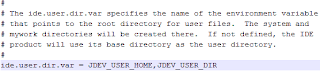
to set environment variables set:
this will create two variable in system variable.
It shows follow pictures.


for now. Restart jdeveloper and run adf application and will create new integreted domain to pointed your location.
The domain located to default location. for example
C:\Users\Administrator\AppData\Roaming\JDeveloper\system11.1.1.4.37.59.23 like this.
to change values of two variables :JDEV_USER_HOME,JDEV_USER_DIR
1. to to oracle product installed directory
2.
3. open jdev.boot file.
4. check below line as picture.

to set environment variables set:
this will create two variable in system variable.
It shows follow pictures.


for now. Restart jdeveloper and run adf application and will create new integreted domain to pointed your location.
Subscribe to:
Posts (Atom)